[Unity Course 2] 08. 게임 매니저 1
위키북스 출판사 이재현 저자님의 '절대강좌! 유니티' 책을 참고하여 필기한 내용입니다.
적 캐릭터의 출현 로직
게임 매니저그이 첫번째 역할 일정 시간 간격으로 몬스터가 불규칙한 위치에 생성
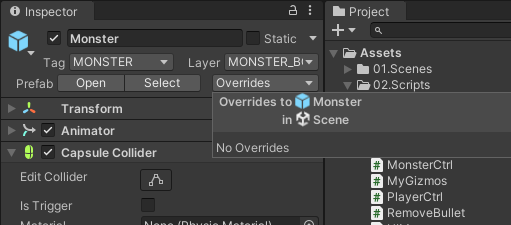
씬뷰에 있는 모든 Monster 삭제하되 먼저 Monster 가 프리팹으로 잘 들어가 있는지 확인하기
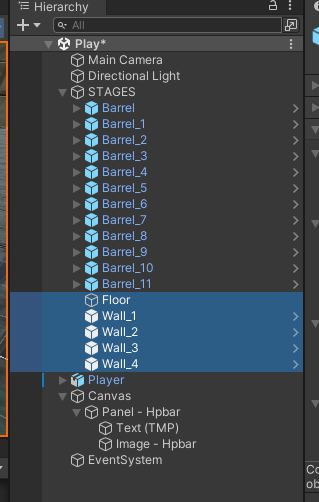
STAGES에 Floor, Wall를 모두 넣어서 차일드화 한다.
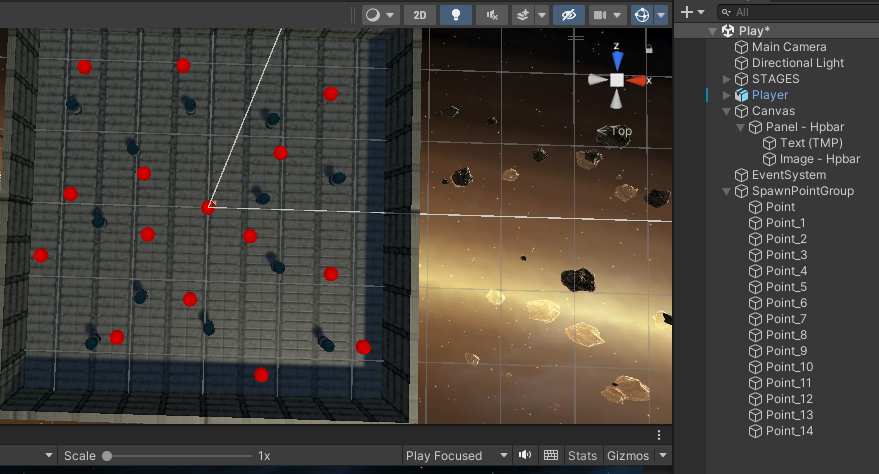
SpawnPointGroup 생성

빈오브젝트를 생성하여 SpawnPointGroup으로 이름을 변경하고 Transform.position은 무조건(0,0,0)으로 설정한다
하위에 Point라는 이름의 빈오브젝트를 생성후 이전에 만들었던 MyGizmos를 드래그 드롭하여 색상을 변경한다.
Point를 여러개 복사하여 맵 곳곳에 배치한다.
GameManager 객체 생성
point 위치에서 적 캐릭터를 생성할 게임 매니저를 제작
게임 오브젝트의 차일드를 추출하는 방법은 여러가지 이지만 다음 두가지로 사용
- Transform.GetComponentsInChildren<T>
- transform
using System.Collections;
using System.Collections.Generic;
using UnityEngine;

public class GameManager : MonoBehaviour
{
    // 몬스터가 출현할 위치를 저장할 배열
    public Transform[] points;

    private void Start()
    {
        // SpawnPointGroup 게임오브젝트의 Transform 컴포넌트 추출
        Transform spawnPointGroup = GameObject.Find("SpawnPointGroup")?.transform;

        // SpawnPointGroup 하위에 있는 모든 차일드 게임오브젝트의 Transform 컴포넌트 추출
        points = spawnPointGroup?.GetComponentsInChildren<Transform>();
    }
}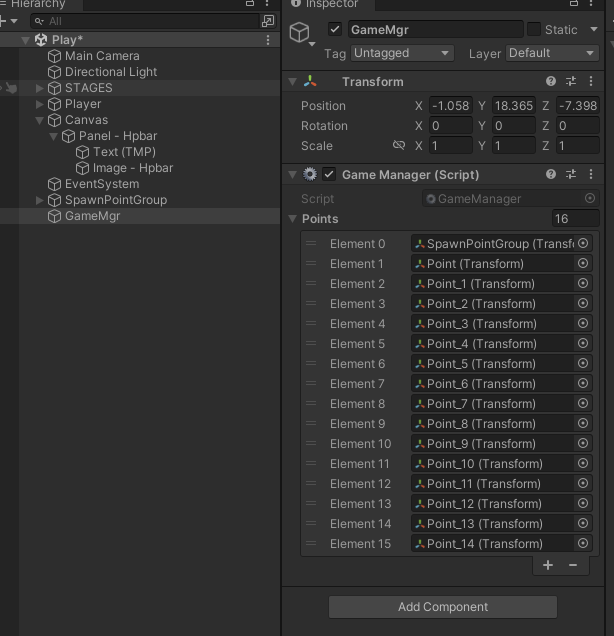
실행하면 위와 같이 하위의 Point 오브젝트의 Transform을 얻어오는걸 확인할 수 있다.
start 함수에서 SpawnPointGroup 게임 오브젝트를 찾아와서 변수에 할당한다.
GameObject.Find("문자열") 함수는 인자로 전달한 문자열과 동일한 게임오브젝트를 반환하는 함수
// SpawnPointGroup 게임오브젝트의 Transform 컴포넌트 추출
Transform spawnPointGroup = GameObject.Find("SpawnPointGroup")?.transform;
? 연산자를 사용하여 SpawnPointGroup을 검색한 결과가 null이 아니라면? 연산자 뒤의 속성을 참조하여 오류가 발생하지 않도록 한다.
// SpawnPointGroup 하위에 있는 모든 차일드 게임오브젝트의 Transform 컴포넌트 추출
points = spawnPointGroup?.GetComponentsInChildren<Transform>();
GameManager 스크립트를 아래와 같이 변경한다
using System.Collections;
using System.Collections.Generic;
using UnityEngine;

public class GameManager : MonoBehaviour
{
    // 몬스터가 출현할 위치를 저장할 배열
    public List<Transform> points = new List<Transform>();

    private void Start()
    {
        // SpawnPointGroup 게임오브젝트의 Transform 컴포넌트 추출
        Transform spawnPointGroup = GameObject.Find("SpawnPointGroup")?.transform;

        // SpawnPointGroup 하위에 있는 모든 차일드 게임오브젝트의 Transform 컴포넌트 추출
        spawnPointGroup?.GetComponentsInChildren<Transform>(points);
    }
}
points의 타입을 Trasnform에서 List타입의 변수로 수정한다.
List 타입은 저장하려는 데이터의 형식을 형식 매개변수인<T>에 저장해야됨
// 몬스터가 출현할 위치를 저장할 List 타입 변수
public List<Transform> points = new List<Transform>();
모든 컴포넌트를 추출해 points에 저장
 // SpawnPointGroup 하위에 있는 모든 차일드 게임오브젝트의 Transform 컴포넌트 추출
 spawnPointGroup?.GetComponentsInChildren<Transform>(points);
GetComponentInsChildren은 다음과 같은 인자와 반환 값을 제공
bool includeInactive 인자는 비활성화된 게임오브젝트까지 반환 값에 포함할 것인지를 결
public Component[] GetComponentsInChildren(Types t);
public void GetComponentsInChildren<T>(List<T> results);
public T[] GetComponentsInChildren<T>();
public void GetComponentsInChildren<T>(bool includeInactive, List<T> result);
public T[] GetComponentsInChildren<T>(bool includeInactive);
아까 값을 보면 부모인 SpawnPointGroup도 갖고온 것을 확인할 수 있는데 우리가 사용하려면 0번째 항목을 제외하고 사용해야된다
부모를 제외하고 자식의 컴포넌트만 추출하고 싶다면 다음과같이 작성
foreach (Transform item in transform)
{
    points.Add(item);
}
자식 오브젝트만 갖고 오기 위해서 코드를 아래와 같이 변
using System.Collections;
using System.Collections.Generic;
using UnityEngine;

public class GameManager : MonoBehaviour
{
    // 몬스터가 출현할 위치를 저장할 List 타입 변수
    public List<Transform> points = new List<Transform>();

    private void Start()
    {
        // SpawnPointGroup 게임오브젝트의 Transform 컴포넌트 추출
        Transform spawnPointGroup = GameObject.Find("SpawnPointGroup")?.transform;

        // SpawnPointGroup 하위에 있는 모든 차일드 게임오브젝트의 Transform 컴포넌트 추출
        //spawnPointGroup?.GetComponentsInChildren<Transform>(points);

        // SpawnPointGroup 하위에 있는 모든 차일드 게임오브젝트의 Tranasform 컴포넌트 추출
        foreach (Transform point in spawnPointGroup)
        {
            points.Add(point);
        }
    }
}
Invoke, InvokeRepeate 함수
using System.Collections;
using System.Collections.Generic;
using UnityEngine;

public class GameManager : MonoBehaviour
{
    // 몬스터가 출현할 위치를 저장할 List 타입 변수
    public List<Transform> points = new List<Transform>();

    // 몬스터의 프리팹을 연결할 변수
    public GameObject monster;

    // 몬스터의 생성 간격
    public float createTime = 3.0f;

    // 게임의 종료 여부를 저장할 멤버 변수
    private bool isGameOver;

    public bool IsGameOver
    {
        get { return isGameOver; }
        set
        {
            isGameOver = value;
            if(isGameOver)
            {
                CancelInvoke("CreateMonster");
            }
        }
    }

    private void Start()
    {
        // SpawnPointGroup 게임오브젝트의 Transform 컴포넌트 추출
        Transform spawnPointGroup = GameObject.Find("SpawnPointGroup")?.transform;

        // SpawnPointGroup 하위에 있는 모든 차일드 게임오브젝트의 Transform 컴포넌트 추출
        //spawnPointGroup?.GetComponentsInChildren<Transform>(points);

        // SpawnPointGroup 하위에 있는 모든 차일드 게임오브젝트의 Tranasform 컴포넌트 추출
        foreach (Transform point in spawnPointGroup)
        {
            points.Add(point);
        }

        // 일정한 시간 간격으로 함수를 호출
        InvokeRepeating("CreateMonster", 2.0f, createTime);
    }
    void CreateMonster()
    {
        // 몬스터의 불규칙한 생성 위치 산출
        int idx = Random.Range(0, points.Count);
        // 몬스터 프리팹 생성
        Instantiate(monster, points[idx].position, points[idx].rotation);
    }
}
프로퍼티 문법을 사용하여 캐릭터가 죽으면 게임이 종료되는 로직을 생성
프로퍼티 : 객체지향 언어의 특징인 데이터 은닉성을 유지하면서 해당 데이터를 안전하게 외부에 노출하는 방법
private인 isGameOver 변수는 외부에 노출되지 않는다. 다른 클래스에서는 IsGameOver 라는 프로퍼티를 선언하여 isGameOver 간접적으로 접근가능
public bool IsGameOver
{
    get { return isGameOver; }
    set
    {
        isGameOver = value;
        if(isGameOver)
        {
            CancelInvoke("CreateMonster");
        }
    }
}
getter 만 생성 하면 ReadOnly가 되고 그 반대도 가능하다.
CancelInvoke는 invokeRepeating 함수로 실행한 함수를 종료하는 역할
Invoke("호출할 함수",대기시간);
InvokeRepeating("호출할 함수",대기시간, 호출간격);
Monster 프리팹의 MonsterCtrl의 traceDist 속성 값을 50으로 변경한다.
주인공이 사망했을 때 PlayerCtrl함수에서 몬스터 스폰을 정지하기 위해 IsGameOver 속성값을 true로 변경한다.
// Player 사망 처리
void PlayerDie()
{
    Debug.Log("Player Die !");
    // 주인공 사망 이벤트 호출(발생)
    OnPlayerDie();

    // GameManager 스크립트의 IsGameOver 프로퍼티 값을 변경
    GameObject.Find("GameMgr").GetComponent<GameManager>().IsGameOver = true;
}